A Compact 4K Drone Built for Vertical, Social-Ready Footage
A closer look at the 4K Drone with HDR Vertical Shooting
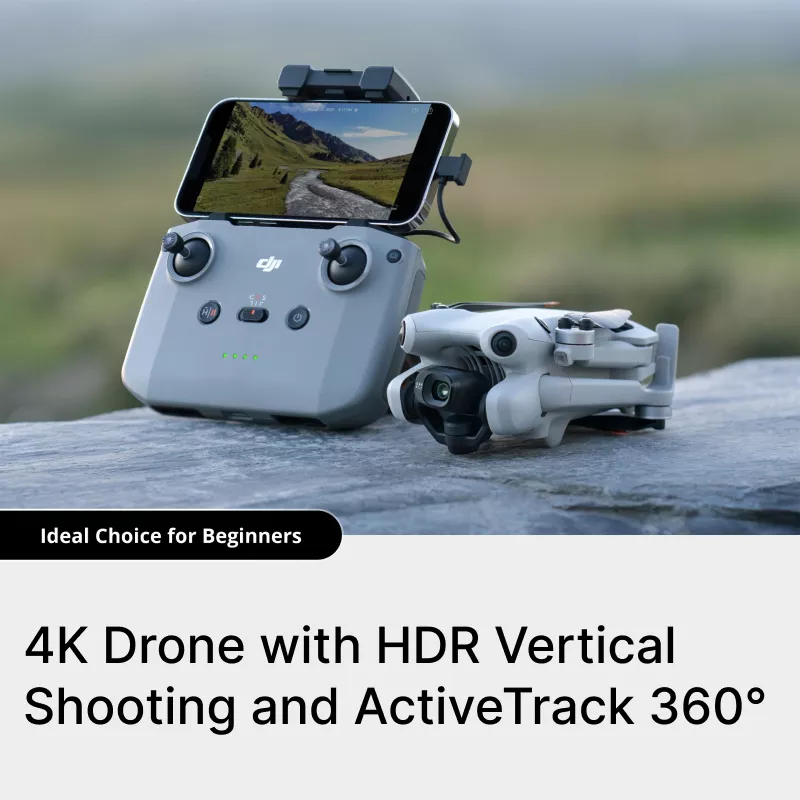
The 4K Drone with HDR Vertical Shooting — folded for travel
Vertical video quietly took over drone photography the same way it took over everything else on our phones. A few years ago, a drone's camera only shot in landscape, and if you wanted footage for Instagram or TikTok you cropped it after the fact and lost a chunk of your resolution doing it. Cameras that physically rotate to shoot native portrait footage changed that, and that capability has since trickled down from flagship drones into much more affordable, compact options — like this one.
What's On the Spec Sheet
Here's what's listed for the 4K Drone with HDR Vertical Shooting:
| Takeoff weight | Under 249 g |
| Video | 4K/60fps HDR, native vertical mode |
| Sensor | 1/1.3" CMOS |
| Color profiles | 10-bit, D-Log M & HLG |
| Obstacle sensing | Omnidirectional |
| Subject tracking | Multi-route automated tracking |
| Video transmission | 1080p/60fps, up to 20 km rated |
| Flight time | Up to 34–45 min depending on battery |
Specs as listed on the product page. As with any compact drone, real-world flight time and transmission range depend on wind, temperature, and interference — treat the top-line numbers as best-case.
Why Native Vertical Shooting Actually Matters
The old workaround for portrait-format drone footage was cropping a horizontal 4K frame down to 9:16 after the flight — which throws away roughly half your resolution before you've even started editing. A camera that physically rotates to shoot vertically captures the full sensor at full resolution in portrait orientation from the start, so what lands in your camera roll is already sized correctly for Reels, TikTok, and Shorts with nothing lost to cropping.
Smart Tracking and Obstacle Sensing, in Plain Terms
Two features do most of the heavy lifting on a drone like this. Automated subject tracking lets the drone follow a moving person or object along a route you set in the app, so you can be the subject of your own footage instead of piloting the whole time — useful for solo travel content, action clips, or just getting yourself in the shot. Omnidirectional obstacle sensing means the drone has sensors covering multiple directions rather than just the front, which matters most when you're flying somewhere with trees, buildings, or wires around and want a safety net if you get distracted framing a shot.
Vetting Any Compact Drone Before You Fly It
Whichever sub-250g drone you're considering, a little diligence up front saves a lot of frustration later. A few things worth doing before your first real flight:
- Watch independent footage samples first. Marketing photos tell you the spec sheet; real flight footage tells you how the image actually holds up in wind, low light, and fast pans.
- Register the drone if your local rules require it once you know its actual takeoff weight with the battery installed — some drones creep over the 250g line with a larger battery attached.
- Read the return and warranty policy before you fly it outdoors for the first time, so you know your options if something doesn't match expectations.
- Update the firmware and calibrate the compass as soon as it arrives, before your first flight away from home.
Know Before You Fly
Staying under a 250-gram takeoff weight is a genuine convenience in a lot of places — in the US, for example, it's the threshold the FAA uses to exempt recreational flyers from mandatory drone registration. But lighter doesn't mean rule-free: airspace restrictions, altitude limits, no-fly zones near airports, and local laws about flying over people or private property still apply no matter what your drone weighs. Registration and licensing rules also vary meaningfully outside the US, so it's worth a quick check of your own country's civil aviation authority before your first flight — this is general information, not legal advice for your specific location.
Getting One
If a lightweight, travel-friendly drone with native vertical shooting is what you've been holding out for, this is a compact option worth a look — especially for social content where portrait-format, full-resolution footage saves you an editing step every time.

No comments:
Post a Comment